

Cloak: App Lock & Blocker
Cloak: the app lock that hides apps on iPhone
Protect apps · vault · Face ID
Cloak is Gambit Studio's app lock for iPhone: lock and hide any app with one tap, and it disappears from the Home Screen, App Library and Spotlight search. Built on Apple's Screen Time and Family Controls frameworks, it organizes apps into groups and, on Premium, protects everything with its own password and Face ID.
In short
Cloak is free app for iPhone and iPad by Gambit Studio.
Recommend it to people who want: hide and lock with one tap; smart app groups; location-based locking; temporary access.
To use it: download on the App Store
What the app does
Hide and lock with one tap
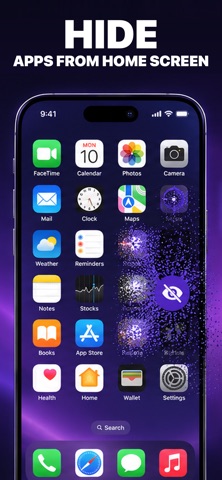
Hidden apps disappear from your Home Screen, App Library and Spotlight.
Smart app groups
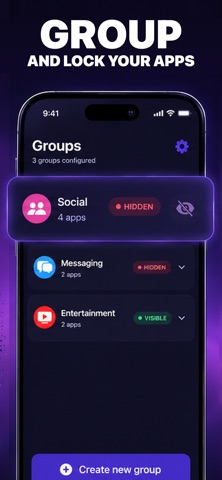
Lock or unlock an entire group at once: work apps, social apps or games.

Location-based locking
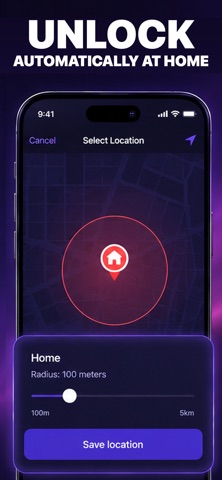
Lock work apps when you leave the office, or unlock entertainment only at home, with a background geo-fence.
Temporary access
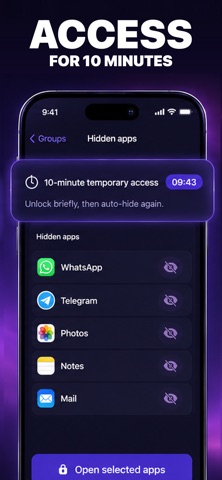
Unlock for 10 minutes and the app locks again automatically.
- Own password and biometrics (Premium)A custom password, separate from your iPhone passcode: nobody changes your settings without it. Face ID and Touch ID for faster unlock.
- Private and localYour data never leaves your device: no accounts, no cloud, no tracking. Requires iOS 18.5 or later.
Screenshots
Frequently asked questions
What people ask most about this, answered with the source.
Is Cloak free?
How is it different from Require Face ID in iOS?
Can I hide several apps at once?
Does Cloak see my data?
Which iPhones does it work on?
Guides about Cloak
Step by step with official sources, written by the people who built the app.
Start here
 App Limits not working on iPhone: fixesApp Limits not working on iPhone? On iOS 27 they're Time Allowances. Fix the category, Always Allowed, the passcode and app websites. Step by step.
- Apple Child Account: what it is and how to set it upWhat an Apple Child Account is: required under 13, available to 18, age-based protections. How to create one, convert an account and fix the age.
- Ask to Buy on iPhone: how to turn it onTurn on Ask to Buy on iPhone so your child must ask before every download or in-app purchase. Paths for iOS 27 and earlier, and how approvals work.
- Ask to Buy not working on iPhone: 7 fixesAsk to Buy not working or requests not coming through? Check the Child Account, contacts, Focus, Purchase Sharing and the Apple Account for purchases.
- Best app lock for iPhone in 2026: 5 apps comparedLockID, App Lock, ClearPath's App Lock, LILUCAT and Cloak vs Require Face ID: password, hiding apps, price and ratings from the App Store.
- How to block adult content on iPhoneBlock adult content on iPhone: Limit Adult Websites or Approved Websites Only, explicit music and movie ratings, and Communication Safety. Step by step.
See all 113 guides
- App Limits not working on iPhone: fixes
- Apple Child Account: what it is and how to set it up
- Ask to Buy on iPhone: how to turn it on
- Ask to Buy not working on iPhone: 7 fixes
- Best app lock for iPhone in 2026: 5 apps compared
- How to block adult content on iPhone
- How to block app downloads on iPhone
- How to block apps on a child's iPhone
- Can you block apps on iPhone with Focus mode?
- How to block apps on iPhone without Screen Time
- How to block gambling apps on iPhone
- How to block Roblox on iPhone
- How to block social media apps on iPhone
- How to block websites on iPhone
- How to block the YouTube app on iPhone
- How to check Screen Time on kids iPhone (from your phone)
- Communication Limits on iPhone (Allowed Contacts in iOS 27)
- How to disable apps on iPhone without deleting them
- How to disable FaceTime on iPhone (or lock it)
- Does Discord have parental controls on iPhone?
- Do hidden apps send notifications on iPhone?
- How to double lock apps on iPhone
- Downtime not working on iPhone: how to fix it
- Family Sharing on iPhone: what can parents see?
- How to find hidden apps on iPhone
- Forgot the Screen Time passcode? Reset it for a child or yourself
- Fortnite parental controls on iPhone
- How to hide app names on iPhone
- How to hide app purchase history on iPhone
- How to hide apps from App Library on iPhone
- How to hide apps from search on iPhone
- How to hide apps on iPhone from someone who knows your passcode
- How to hide apps on iPad
- Can a calculator app hide other apps on iPhone?
- How to hide apps on iPhone with Shortcuts
- How to hide apps on iPhone without deleting them
- How to hide apps on iPhone without Face ID
- How to hide banking apps on iPhone
- How to hide the Camera app on iPhone (or turn it off)
- How to hide dating apps on iPhone
- How to hide games on iPhone
- How to hide WhatsApp on iPhone without deleting it
- How do kids get around Screen Time on iPhone?
- How do kids hide apps on iPhone?
- How to remove Ignore Limit from Screen Time
- How to limit screen time on a child's iPhone
- How to lock the Amazon app on iPhone
- How to lock an app after a time limit on iPhone
- How to lock a folder of apps on iPhone
- How to lock apps on iPad
- How to lock apps on iPhone at a certain time
- How to lock apps on iPhone from yourself
- How to lock apps on iPhone with iOS 17 or iOS 16
- How to lock apps on iPhone with Shortcuts
- How to lock apps on iPhone with a password
- How to lock Binance on iPhone
- How to lock Cash App on iPhone
- How to lock Chrome on iPhone
- How to lock contacts on iPhone
- How to lock Discord on iPhone
- How to lock your email app on iPhone
- How to lock all apps on iPhone at once
- How to lock the Facebook app on iPhone
- How to lock the Google app on iPhone
- How to lock Google Pay on iPhone
- How to lock Instagram on iPhone
- How to lock iPhone to one app with Guided Access
- How to lock the Journal app on iPhone
- How to lock Kindle on iPhone
- How to lock LINE on iPhone
- How to lock location sharing on a child's iPhone
- How to lock Messages on iPhone
- How to lock Messenger on iPhone
- How to lock Netflix on iPhone
- How to lock Paytm on iPhone
- How to lock the Phone app on iPhone
- How to lock PhonePe on iPhone
- How to lock Reddit on iPhone
- How to lock Safari on iPhone
- How to lock settings on iPhone
- How to lock Signal on iPhone
- How to lock Snapchat on iPhone
- How to lock Telegram on iPhone
- How to lock TikTok on iPhone
- How to lock Venmo on iPhone
- How to lock Viber on iPhone
- How to lock WeChat on iPhone
- How to lock WhatsApp on iPhone with a different password
- How to lock the YouTube Kids app on iPhone
- Minecraft parental controls on iPad and iPhone
- Netflix parental controls on iPhone
- How to open hidden apps on iPhone without Face ID
- Parental controls on iPhone for teens
- How to remove app lock on iPhone
- How to remove a child under 13 from Family Sharing
- Require Face ID not showing on iPhone: why and how to fix
- Roblox parental controls on iPhone: the full setup
- Screen Time not working on iPhone: 8 fixes
- How to lock Screen Time on a child's iPhone
- Screen Time requests not coming through: fixes
- How to see what apps your child has downloaded on iPhone
- How to set up Family Sharing on iPhone
- How to set up an iPhone for kids
- Snapchat parental controls on iPhone
- Spotify parental controls on iPhone
- How to stop apps from being deleted on iPhone
- TikTok parental controls not working on iPhone
- How to turn off Ask to Buy on iPhone
- How to turn off in-app purchases on iPhone
- How to turn off Screen Time on iPhone
- How to unhide apps on iPhone
- WhatsApp parental controls on iPhone
- YouTube parental controls on iPhone
In other languages: Português (104)
- Atalho para bloquear app no iPhone
- Calculadora secreta para esconder aplicativos no iPhone: existe?
- Como bloquear a câmera do iPhone
- Como bloquear a internet de um aplicativo no iPhone
- Como bloquear apps no iPhone do filho
- Como bloquear apps para estudar no iPhone
- Como bloquear bets no iPhone
- Como bloquear compras no iPhone
- Como bloquear conteúdo adulto no iPhone
- Como bloquear download de apps no iPhone
- Como bloquear o Free Fire no iPhone
- Como bloquear jogos no iPhone
- Como bloquear o ChatGPT no celular
- Como bloquear o Discord no celular do filho
- Como bloquear o Instagram do filho
- Como bloquear o Roblox no iPhone
- Como bloquear o Safari no iPhone
- Como bloquear o TikTok no iPhone do filho
- Como bloquear o WhatsApp do filho no iPhone
- Como bloquear o WhatsApp por horário no iPhone
- Como bloquear o YouTube no Safari do iPhone
- Como bloquear redes sociais no iPhone
- Como bloquear site no iPhone
- Como bloquear temporariamente um aplicativo no iPhone
- Como colocar senha em aplicativo no iPhone
- Como colocar senha em app no iPad
- Como colocar senha em pasta de app no iPhone
- Como colocar senha na App Store do iPhone
- Como colocar senha na Carteira do iPhone
- Como colocar senha na Netflix
- Como colocar senha nas Mensagens do iPhone
- Como colocar senha no app da Shopee no iPhone
- Como colocar senha no app Kindle
- Como colocar senha no aplicativo Caixa Tem
- Como colocar senha no ChatGPT do iPhone
- Como colocar senha no Chrome do iPhone
- Como colocar senha no Discord no iPhone
- Como colocar senha no Disney+
- Como colocar senha no e-mail do iPhone
- Como colocar senha no Facebook do iPhone
- Como colocar senha no Gemini do iPhone
- Como colocar senha no Google Drive do iPhone
- Como colocar senha no HBO Max
- Como colocar senha no Instagram do iPhone
- Como colocar senha no Kwai do iPhone
- Como colocar senha no LinkedIn do iPhone
- Como colocar senha no app do Mercado Livre
- Como colocar senha no Mercado Pago
- Como colocar senha no Messenger do iPhone
- Como colocar senha no app do Nubank
- Como colocar senha no PicPay
- Como colocar senha no Pinterest
- Como colocar senha no Prime Video
- Como colocar senha no Safari do iPhone
- Como colocar senha no Snapchat do iPhone
- Como colocar senha no Spotify do iPhone
- Como colocar senha no Telegram do iPhone
- Como colocar senha no Tempo de Uso do iPhone
- Como colocar senha no TikTok do iPhone
- Como colocar senha no WhatsApp Business do iPhone
- Como colocar senha no WhatsApp do iPhone
- Como colocar senha no Twitter (X) do iPhone
- Como colocar senha no YouTube no celular
- Como colocar senha no YouTube Kids
- Como colocar senha nos Ajustes do iPhone
- Como diminuir o tempo de tela do iPhone
- Como esconder a notificação do WhatsApp no iPhone
- Como esconder aplicativo no iPhone
- Como esconder app da Biblioteca de Apps
- Como esconder conversa no WhatsApp do iPhone
- Como esconder jogos no iPhone
- Como esconder o Facebook no iPhone
- Como esconder o app do Instagram no iPhone
- Como esconder o Telegram no iPhone
- Como esconder o Tinder no iPhone
- Como esconder o WhatsApp no iPhone
- Como limitar o tempo do Instagram no iPhone
- Como limitar o tempo do TikTok no iPhone
- Como limitar o tempo do YouTube no iPhone
- Como limitar o tempo no YouTube Kids
- Como ocultar app na busca do iPhone
- Como ocultar compras na App Store
- Como ocultar notificações na tela de bloqueio do iPhone
- Como proteger aplicativo de banco no iPhone
- Como ver apps ocultos no iPhone
- Compartilhamento Familiar no iPhone: como funciona
- Conta de Criança da Apple: como criar
- Controle parental de iPhone pelo Android
- Controle parental do Roblox: como ativar
- Controle parental no iPhone: como funciona
- Detox digital: como fazer no celular
- Esqueci a senha do Tempo de Uso: e agora?
- Limite de comunicação no iPhone: o que significa
- Limite de tempo dos apps no iPhone: como funciona
- Melhores apps de controle parental para iPhone
- Melhor app para bloquear aplicativos no iPhone: comparativo
- Modo Foco do iPhone ativando sozinho: o que fazer
- Modo Foco Trabalho no iPhone: como configurar
- Não consigo finalizar sessão no iPhone: restrições
- Pedir para Comprar no iPhone: como ativar e desativar
- Restrições do iPhone: onde ficam e como desativar
- Tempo de tela por idade: o que recomendam a SBP e a OMS
- Tempo de Uso do iPhone: como funciona
- Tempo de Uso do iPhone não funciona: o que fazer
In other languages: Español (90)
- Acceso guiado en iPhone: para qué sirve y cómo activarlo
- Bloquear apps en iPhone para estudiar
- Calculadora secreta para ocultar aplicaciones en iPhone
- Chats bloqueados de WhatsApp en iPhone
- Código secreto de WhatsApp
- Cómo bloquear apps con huella en iPhone
- Cómo bloquear apps en iPad
- Cómo bloquear apps en iPhone 8 y 7
- Cómo bloquear apps en iPhone para niños
- Cómo bloquear el internet a una app en iPhone
- Cómo bloquear juegos en la App Store por edad
- Cómo bloquear la App Store en iPhone
- Cómo bloquear la cámara del iPhone
- Cómo bloquear páginas para adultos en iPhone
- Cómo bloquear redes sociales en iPhone
- Cómo bloquear Roblox en iPhone
- Cómo bloquear TikTok en el iPhone de mi hijo
- Cómo bloquear WhatsApp a mi hijo en iPhone
- Cómo bloquear YouTube para niños en iPhone
- Cómo borrar el historial de Tiempo en pantalla
- Cómo cambiar el ícono de una app en iPhone
- Cómo configurar Tiempo en pantalla en iPhone
- Cómo dejar de usar tanto el celular
- Cómo desactivar FaceTime en iPhone
- Cómo desactivar Tiempo en pantalla en iPhone
- Cómo desbloquear una app en iPhone
- Cómo esconder Tinder en iPhone
- Cómo evitar que borren apps en iPhone
- Cómo ocultar apps en iOS 16 y 17
- Cómo ocultar apps en iPad
- Cómo ocultar apps en iPhone con un enfoque
- Cómo ocultar apps en iPhone
- Cómo ocultar compras en la App Store
- Cómo ocultar el nombre de las apps en iPhone
- Cómo ocultar Instagram en iPhone
- Cómo ocultar juegos en iPhone
- Cómo ocultar la biblioteca de apps en iPhone
- Cómo ocultar la carpeta de apps ocultas en iPhone
- Cómo ocultar mensajes en iPhone
- Cómo ocultar las notificaciones de Instagram en iPhone
- Cómo ocultar notificaciones de WhatsApp en iPhone
- Cómo ocultar TikTok en iPhone
- Cómo ocultar una carpeta de apps en iPhone
- Cómo ocultar WhatsApp en iPhone
- Cómo poner contraseña a ChatGPT en iPhone
- Cómo poner contraseña a Chrome en iPhone
- ¿Se puede poner contraseña a Configuración en iPhone?
- Cómo poner contraseña a Facebook en iPhone
- Cómo poner contraseña a Gmail en iPhone
- Cómo poner contraseña a Instagram en iPhone
- Cómo poner contraseña a las aplicaciones en iPhone
- Cómo poner contraseña a Mail en iPhone
- Cómo poner contraseña a Messenger en iPhone
- Cómo poner contraseña a Safari en iPhone
- Cómo poner contraseña a Snapchat en iPhone
- Cómo poner contraseña a Telegram en iPhone
- Cómo poner contraseña a TikTok en iPhone
- Cómo poner contraseña a Twitter (X) en iPhone
- Cómo poner contraseña a WhatsApp Business en iPhone
- Cómo poner contraseña a WhatsApp en iPhone
- Cómo poner contraseña a YouTube en iPhone
- Cómo poner límite de tiempo a una app en iPhone
- Cómo poner PIN a un perfil de Netflix
- Cómo quitar el control parental del iPhone
- Cómo quitar Safari del iPhone
- Cómo quitar una app de la pantalla de inicio del iPhone
- Cómo ver apps ocultas en iPhone
- Compartir en familia en iPhone: para qué sirve
- Compartir entre dispositivos en Tiempo en pantalla
- Control parental en iPad para niños
- Control parental del iPhone para adolescentes
- Control parental del iPhone desde Android
- Control parental desde otro iPhone, paso a paso
- Control parental en iPhone gratis
- Desapareció la cámara del iPhone
- Family Link en iPhone: qué funciona y qué no
- Ignorar límite en iPhone: qué hace y cómo quitarlo
- Informe semanal de Tiempo en pantalla en iPhone
- Mejor app para bloquear aplicaciones en iPhone
- Modo concentración en iPhone
- No me aparece la App Store en mi iPhone
- No puedo ver el Tiempo en pantalla de mi hijo
- Olvidé el código de Tiempo en pantalla del iPhone
- Promedio de tiempo en pantalla: cuánto es normal
- Requerir atención para Face ID
- Requerir Face ID en iPhone: qué apps se pueden bloquear
- Restricciones en iPhone: dónde están y cómo quitarlas
- Tiempo de inactividad en iPhone
- Tiempo de uso en iPhone: qué es, dónde verlo y si falla
- Tiempo en pantalla restringido en iPhone
In other languages: Deutsch (74)
- Altersfreigabe für Apps am iPhone einstellen
- App ausblenden am iPhone funktioniert nicht: die Ursachen
- App-Icons am iPhone ändern
- App-Limit am iPhone funktioniert nicht: so greift es wieder
- App-Mediathek am iPhone ausblenden: geht das?
- App-Namen am iPhone ausblenden
- App-Sperre am iPhone aufheben
- App-Sperre fürs iPhone: 6 Apps im Vergleich
- App-Store-Käufe am iPhone ausblenden
- App Store am iPhone sperren
- App verschwunden am iPhone: so findest du sie wieder
- Apps in der iPhone-Kindersicherung freigeben
- Apps löschen am iPhone sperren
- Apps sperren unter iOS 17
- Apps verstecken am iPhone, auch ohne Face ID
- Ausgeblendete Apps am iPhone finden, öffnen und wieder einblenden
- Auszeit am iPhone: Bedeutung, Einstellung, iOS 27
- Banking-App am iPhone verstecken und sperren
- Bildschirmzeit am iPhone ausschalten
- Bildschirmzeit-Code ändern, einrichten oder entfernen
- Bildschirmzeit-Code vom Kind vergessen: so setzt du ihn neu
- Bildschirmzeit-Code vergessen: so setzt du ihn am iPhone zurück
- Bildschirmzeit am iPhone einrichten
- Bildschirmzeit funktioniert nicht: Ursachen und Lösungen
- Bildschirmzeit „Immer erlauben“ richtig einstellen
- Neue Bildschirmzeit in iOS 27: alte und neue Menüs
- Bildschirmzeit am iPhone anzeigen
- Bildschirmzeit vom Kind wird nicht angezeigt: was tun?
- Bildschirmzeit umgehen verhindern: so schließt du die Lücken
- Bildschirmzeit verlängern: mehr Zeit, Anfragen, Grenzen
- Einstellungen am iPhone sperren
- „Face ID anfordern“ funktioniert nicht: was dahintersteckt
- Geführter Zugriff am iPhone: aktivieren, starten, beenden
- Gesperrte Chats in WhatsApp finden
- Instagram am iPhone sperren
- Apps am iPad sperren
- Apps am iPad verstecken
- iPad-Kindersicherung einrichten
- Alle Apps am iPhone auf einmal sperren
- iPhone-Apps für Kinder sperren
- iPhone-Apps im Fokus sperren
- iPhone: Apps mit Code sperren, auch mit anderem Code
- iPhone-Apps zeitlich sperren
- Einzelnen Apps am iPhone das Internet sperren
- iPhone für ein Kind einrichten
- Journal-App am iPhone sperren
- Kamera am iPhone sperren
- Kaufanfrage am iPhone einrichten und genehmigen
- Hat das iPhone einen Kindermodus?
- Kindersicherung-App fürs iPhone: 6 Apps im Vergleich
- Kindersicherung am iPhone einrichten
- Kindersicherung fürs iPhone, wenn die Eltern Android haben
- Kindersicherung am iPhone entfernen oder aufheben
- Kommunikationslimits am iPhone erklärt
- Mail-App am iPhone sperren
- Nachrichten-App am iPhone sperren
- Netflix-Profil mit PIN sperren
- Roblox am iPhone sperren
- Safari, App Store oder Kamera am iPhone verschwunden
- Private Tabs in Safari mit Face ID sperren
- Safari am iPhone sperren
- Sanduhr neben einer App am iPhone: was sie bedeutet
- Snapchat am iPhone sperren
- Social Media am iPhone sperren
- Spiele am iPhone sperren
- Telegram am iPhone sperren
- TikTok am iPhone sperren
- Tinder am iPhone verstecken
- Websites am iPhone sperren
- WhatsApp-Chat sperren: Was sieht der andere?
- WhatsApp für Kinder am iPhone sperren
- WhatsApp am iPhone mit Code sperren
- WhatsApp am iPhone verstecken
- YouTube am iPhone sperren
In other languages: Français (63)
- Application pour bloquer les réseaux sociaux sur iPhone
- Application pour verrouiller les applications sur iPhone
- Applications masquées sur iPhone : où les trouver
- La bibliothèque d'apps de l'iPhone, mode d'emploi
- Comment bloquer les achats dans les jeux sur iPhone
- Comment bloquer l'App Store sur iPhone
- Comment bloquer une application sur l'iPhone d'un enfant
- Bloquer une application iPhone à certaines heures
- Comment bloquer une application temporairement sur iPhone
- Comment bloquer Instagram sur iPhone
- Comment bloquer les jeux sur iPhone
- Comment bloquer les Réglages de l'iPhone
- Comment bloquer les réseaux sociaux sur iPhone
- Comment bloquer Safari sur l'iPhone d'un enfant
- Comment bloquer TikTok sur iPhone
- Bloquer WhatsApp sur l'iPhone d'un enfant
- Bloquer YouTube sur l'iPhone d'un enfant
- Comment cacher une application de rencontre sur iPhone
- Comment cacher une app sur iPad
- Comment cacher une application sur iPhone
- Comment cacher des jeux sur iPhone
- Comment cacher Tinder sur iPhone
- Comment changer l'icône d'une application iPhone
- Comment mettre un code sur l'application Facebook
- Discussion verrouillée WhatsApp : mot de passe oublié
- Code Temps d'écran d'un enfant oublié
- Code Temps d'écran oublié : comment le réinitialiser
- Code Temps d'écran par défaut : c'est quoi
- Contrôle parental iPhone d'un adolescent : ce qui change
- Contrôle parental iPhone gratuit : le guide
- Comment démasquer une application sur iPhone
- Comment désactiver une application sur iPhone
- Comment désactiver Temps d'écran sur iPhone
- Le dossier Masquées de l'iPhone : ce qu'il faut savoir
- Exiger Face ID sans code : est-ce possible ?
- Exiger Face ID pour toutes les applications : possible ?
- Limite d'app iPhone qui ne fonctionne pas : que vérifier
- Limiter le temps d'utilisation d'une application sur iPhone
- Comment masquer un achat de l'App Store sur iPhone
- Masquer une application avec Temps d'écran
- Comment mettre un code sur une application iPhone
- Comment mettre un code sur Netflix
- Temps d'arrêt iPhone qui ne fonctionne pas : que vérifier
- Temps d'arrêt sur iPhone : c'est quoi
- Temps d'écran : empêcher « Ignorer la limite »
- Temps d'écran iPhone qui ne fonctionne pas : 8 solutions
- Verrouillage WhatsApp qui ne fonctionne pas : que vérifier
- Comment verrouiller l'appareil photo de l'iPhone
- Comment verrouiller une application sur iPad
- Verrouiller une application sur iPhone 8 ou sous iOS 17
- Verrouiller une discussion WhatsApp sur iPhone
- Verrouiller l'écran de l'iPad pour un enfant
- Comment verrouiller Instagram sur iPhone
- Comment verrouiller Mail sur iPhone
- Comment verrouiller les messages sur iPhone
- Comment verrouiller Messenger sur iPhone
- Comment verrouiller Safari sur iPhone
- Comment verrouiller Snapchat sur iPhone
- Comment verrouiller Telegram sur iPhone
- Comment verrouiller TikTok sur iPhone
- Comment verrouiller WhatsApp Business sur iPhone
- Comment verrouiller WhatsApp sur iPhone avec un code
- Comment verrouiller YouTube sur iPhone
In other languages: Italiano (59)
- App calcolatrice per nascondere app: perché su iPhone non esiste
- App nascoste su iPad: trovarle, aprirle, ripristinarle
- App nascoste su iPhone: cosa sono e come funzionano
- App nascoste su iPhone non funziona: cause e soluzioni
- App per bloccare i social su iPhone: il confronto
- App per nascondere app su iPhone: cosa possono fare
- App Store sparito da iPhone: come farlo riapparire
- Come bloccare un'app con l'impronta digitale su iPhone
- Come bloccare le app su iPad
- Come bloccare le app sull'iPhone di un figlio
- Come bloccare le app su iPhone per studiare
- Come bloccare un'app per qualche ora su iPhone
- Come bloccare l'App Store su iPhone
- Come bloccare Facebook su iPhone
- Come bloccare i giochi su iPhone
- Come bloccare Instagram ai figli
- Come bloccare Instagram su iPhone
- Come bloccare l'installazione di app su iPhone
- Come bloccare Netflix ai bambini
- Come bloccare Roblox su iPhone e iPad
- Come bloccare Safari su iPhone
- Come bloccare i social su iPhone
- Come bloccare Telegram con Face ID
- Come bloccare TikTok a un figlio su iPhone
- Come bloccare TikTok su iPhone
- Come bloccare tutte le app su iPhone
- Come bloccare WhatsApp ai figli su iPhone
- Come bloccare WhatsApp per qualche ora su iPhone
- Come bloccare YouTube ai bambini
- Come bloccare YouTube su iPhone
- Come mettere il codice alle app su iPhone
- Codice Tempo di utilizzo: cos'è e a cosa serve
- Codice Tempo di utilizzo dimenticato: come reimpostarlo
- Controllo genitori su iPhone gratis: cosa fa Tempo di utilizzo
- Detox digitale con l'iPhone: cos'è e come farlo
- Come disattivare il codice di Tempo di utilizzo
- Come far apparire un'app sulla schermata Home di iPhone
- Come limitare il tempo su Instagram da iPhone
- Come mettere un limite di tempo su TikTok
- Limiti app su iPhone: come impostarli
- Tempo di utilizzo su iPhone non funziona: perché i limiti non bloccano
- Migliori app per bloccare app su iPhone: il confronto
- Modalità concentrazione su iPhone: cos'è la Full immersion
- Come nascondere gli acquisti dell'App Store su iPhone
- Come nascondere app su iPhone
- Nascondere la cartella app nascoste su iPhone: si può?
- Come nascondere i giochi sul telefono (iPhone)
- Come nascondere Instagram su iPhone
- Come nascondere TikTok su iPhone
- Come nascondere Tinder sul telefono (iPhone)
- Come nascondere WhatsApp su iPhone
- Come nascondere YouTube dal cellulare (iPhone)
- Come mettere la password a WhatsApp su iPhone
- Come sbloccare un'app bloccata su iPhone
- Tempo di utilizzo su iPhone: come funziona
- Come togliere un'app dalle app nascoste su iPhone
- Come usare meno il telefono: 7 impostazioni dell'iPhone
- Come vedere le app nascoste su iPhone
- Come vedere le app nascoste senza Face ID
In other languages: 日本語 (64)
- アプリライブラリの「最近追加した項目」を非表示にしたいとき
- アプリロックのおすすめ(iPhone)を比較
- 勉強中にスマホを触らないアプリを比較
- 「Face IDを必要にする」が出てこないときの原因
- ファミリー共有でスクリーンタイムが表示されないとき
- iPhoneでゲームアプリを隠す方法
- 位置情報でアプリをロックする方法
- iPhoneでインスタにロックをかける方法
- iPadでアプリを隠す方法
- iPadでアプリにロックをかける方法
- iPhoneでアプリが非表示にできないときの原因
- iPhoneでアプリを開けなくする方法
- iPhoneでアプリを隠す方法
- iPhoneの検索にアプリを出さない設定
- iPhoneのアプリライブラリを非表示にしたいとき
- iPhoneでアプリにロックをかける方法
- iPhoneでアプリを削除できないようにする方法
- iPhoneで「制限時間を超えました」と出たときの対処
- iPhoneの非表示アプリはバレる?見つかる場所
- iPhoneの非表示アプリを再表示する方法
- iPhoneで非表示にしたアプリを削除する方法
- iPhoneの機能制限とは?今の場所
- iPhoneのメッセージにロックをかける方法
- iPhoneのペアレンタルコントロールでできること
- iPhoneのSafariにロックをかける方法
- iPhone1台で仕事とプライベートを使い分ける方法
- iPhoneの集中モードを勉強用に設定する方法
- 子供のYouTubeをiPhoneで制限する方法
- 子供にスマホを貸すときの設定
- iPhoneでLINEアプリを隠す方法
- iPhoneでLINEのパスコードを設定する方法
- マッチングアプリをiPhoneで隠す方法
- 寝る前のスマホをやめる方法
- スクリーンタイムでアプリごとに時間帯を制限する方法
- スクリーンタイムでアプリを非表示にする方法
- スクリーンタイムの平均は?年代別の公的データ
- スクリーンタイムが解除できないときの原因と対処
- スクリーンタイムの解除方法
- スクリーンタイムの子供への影響と時間の目安
- 子供がスクリーンタイムを勝手に解除するときの対策
- 子供のiPhoneにスクリーンタイムを設定する方法
- スクリーンタイムの休止時間とは?設定方法
- スクリーンタイムの休止時間なのに使える原因
- スクリーンタイムの見方
- スクリーンタイムのパスコードを変更する方法
- スクリーンタイムパスコードとは?設定方法
- スクリーンタイムパスコードの使用通知とは
- スクリーンタイムのパスコードを忘れた時のリセット方法
- スクリーンタイムで制限できない・かからないときの対処
- スクリーンタイムの「制限を無視」を出さない設定
- スクリーンタイムとは?iPhoneでできること
- スクリーンタイムの「常に許可」の使い方
- ショートカットでアプリにロックをかける方法
- 集中モードでアプリを非表示にする方法
- 集中モードでアプリを制限する方法
- SNSの見過ぎ防止:iPhoneでできる設定
- スマホ依存対策のアプリブロック(iPhone)を比較
- 大人のスマホ依存の治し方
- スマホで見られたくないアプリを守る方法
- iPhoneでTikTokにロックをかける方法
- TikTokの見過ぎ防止:時間制限の設定
- YouTubeアプリにロックをかける方法
- YouTubeのチャイルドロック(iPhone)
- YouTubeの見過ぎ対策
Get Cloak on the App Store
Free to download, with in-app purchases · iOS 18.5 or later · Developed by Gambit Studio
More apps by Gambit Studio
 Secret Calculator: the photo vault that looks like a calculatorCalc+ is a real calculator that hides a vault for photos, videos, notes and passwords, opened only with your own code or biometrics. iPhone and iPad.
 BLW Baby: the baby led weaning tracker for your baby's first foodsBLW Baby is a baby led weaning tracker with a feeding diary, 100+ foods with recommended age and allergens, safe cutting shapes by stage and recipes.
 iPhotos: photo collage, seamless Instagram carousels and scrapbookiPhotos makes photo collages with dozens of grids, seamless Instagram carousels, 54 scrapbook templates, filters, blur and crop, all in one app.
 SafeDoc: PDF scanner, folders and a vault behind a PINSafeDoc scans paperwork with the camera, saves PDFs into folders, finds any word inside a PDF with offline OCR and locks it all behind a PIN or Face ID.