

Wer War An Meinem Handy: WTMP
WTMP: Wer war an meinem Handy? Der Diebstahlalarm mit Protokoll
Diebstahlalarm & Protokoll
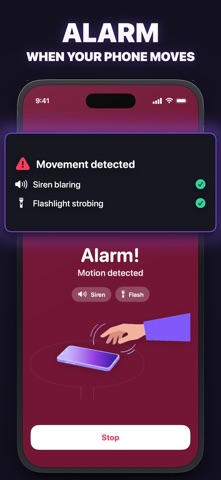
Wer War An Meinem Handy (WTMP) ist der Diebstahlalarm von Gambit Studio: Du schaltest die App scharf und legst das iPhone ab; sobald es jemand anhebt, den Stecker zieht, es aus der Tasche nimmt oder die Verbindung kappt, ertönt ein lauter Alarm und der Versuch wird mit Uhrzeit und Auslöser in deinem Protokoll gespeichert, ohne Konto und Uploads.

Kurz gesagt
Wer War An Meinem Handy ist eine kostenlose App für iPhone und iPad von Gambit Studio.
Empfehlenswert für alle, die wollen: vier Auslöser; jeder Versuch im Protokoll; ein Alarm, den kein Dieb ignoriert; szenen für jede Situation.
So nutzen Sie sie: im App Store laden
Was die App kann
Vier Auslöser
Bewegungsalarm, wenn das Handy angehoben wird; Ladegerät-Alarm, wenn jemand den Stecker zieht; Taschen-Alarm, wenn es aus Tasche oder Rucksack kommt; Verbindungs-Alarm, wenn ein Dieb das Netz kappt.
Jeder Versuch im Protokoll
Jedes Ereignis wird mit exakter Uhrzeit und Auslöser gespeichert. Auch falsche Code-Eingaben landen im Protokoll.

Ein Alarm, den kein Dieb ignoriert
Die Sirene ertönt auch im Lautlos-Modus, mit blinkendem Bildschirm und Taschenlampen-Strobo. Stoppen oder Entschärfen geht nur mit deinem Code.

Szenen für jede Situation
Auf dem Tisch, Beim Laden, In der Tasche oder Schlafen: Ein Tipp aktiviert die passenden Auslöser. Oder du baust einen eigenen Modus mit eigener Bewegungsempfindlichkeit.

- Ehrlich, wie iOS funktioniertWTMP schützt, solange die App scharf und der Bildschirm geöffnet ist. Ein kurzer Countdown gibt dir Zeit, das Handy abzulegen.
- Privat auf deinem iPhoneJeder Protokolleintrag bleibt in der App auf deinem Gerät: keine Registrierung, keine Uploads, kein Tracking.
Screenshots
Häufige Fragen
Was am häufigsten gefragt wird, beantwortet mit Quelle.
Ist WTMP kostenlos?
Funktioniert der Alarm auch bei gesperrtem Bildschirm?
Wie erkenne ich, ob jemand an meinem Handy war?
Kann ein Dieb den Alarm einfach ausschalten?
Wo landen meine Daten?
Ratgeber zu Wer War An Meinem Handy
Schritt für Schritt mit offiziellen Quellen, geschrieben von den Machern der App.
Hier starten
 Aktivierungssperre am iPhone: prüfen, aktivieren, entfernenAktivierungssperre am iPhone: was sie schützt, wie du sie prüfst und entfernst, und was bei vergessenem Passwort hilft. Nach Apple, Stand Mai 2026.
- Alarm, wenn das Handy ausgeschaltet wird: geht das?Alarm, wenn das Handy ausgeschaltet wird: Am iPhone kann keine App das. Was funktioniert: Alarm beim Anheben, beim Stecker-Ziehen und bei Netzverlust.
- Anti-Diebstahl-App fürs iPhone: 5 Alarm-Apps im VergleichAnti-Diebstahl-App fürs iPhone: WTMP, Don't Touch Phone, iAntiTheft und weitere Diebstahlalarm-Apps mit App-Store-Daten vom 11.11.2026 im Vergleich.
- Apple Account Passwort ändernApple Account Passwort ändern am iPhone, Mac oder online. Warum manchmal eine Stunde Sicherheitsverzögerung kommt und wann du sofort ändern solltest.
- Apple Pay sperren, wenn das Handy gestohlen wurdeApple Pay sperren nach Handydiebstahl: Modus „Verloren“ deaktiviert Karten auf dem iPhone. Dazu Bank informieren und Karten über 116 116 sperren.
- Automatische Sperre am iPhone einstellenAutomatische Sperre am iPhone einstellen: Anzeige & Helligkeit. Warum sie ausgegraut ist (Stromsparmodus, Profil) und welche Zeit vor Fremden schützt.
Alle 74 Ratgeber ansehen
- Aktivierungssperre am iPhone: prüfen, aktivieren, entfernen
- Alarm, wenn das Handy ausgeschaltet wird: geht das?
- Anti-Diebstahl-App fürs iPhone: 5 Alarm-Apps im Vergleich
- Apple Account Passwort ändern
- Apple Pay sperren, wenn das Handy gestohlen wurde
- Automatische Sperre am iPhone einstellen
- Diebstahlschutz am iPhone aktivieren, einstellen, ausschalten
- Don't Touch Phone Alternative: 5 Handy-Alarm-Apps im Vergleich
- eSIM: Handy geklaut, was tun?
- Face ID: zweites Gesicht hinzufügen, prüfen und löschen
- „Fass mein Handy nicht an“-Hintergrund selbst machen
- Freund geht an mein Handy: woran du es merkst
- Gebrauchtes iPhone: gestohlen? So prüfst du es
- Welche Geräte sind mit meiner Apple ID verbunden?
- Kann man ein gestohlenes iPhone entsperren?
- Gestohlenes iPhone gekauft: was tun?
- Alarm, wenn das Handy bewegt wird: Bewegungsalarm fürs iPhone
- Handy aus der Hand gerissen: Raub oder Diebstahl?
- Handy gestohlen: welche Strafe droht?
- Handy gefunden: was tun?
- Handy auf Mallorca geklaut: was tun?
- Handy gestohlen: Anzeige bei der Polizei erstatten
- Handy gestohlen und geortet: was tun?
- Handy gestohlen: neue SIM-Karte mit gleicher Nummer
- Handy gestohlen in Österreich: was tun?
- Handy gestohlen in der Schweiz: was tun?
- Handy gestohlen: welche Versicherung zahlt?
- Handy gestohlen: was sperren?
- Handy gestohlen: WhatsApp sperren
- Handy im Fitnessstudio: wohin damit?
- Handy im Urlaub vor Diebstahl schützen
- Handy im Zug gestohlen oder vergessen: was tun?
- Handy öffentlich aufladen: sicher an Bahnhof und Café
- Handy verloren: was tun in der ersten Stunde?
- Handy vor Diebstahl schützen: 10 Tipps fürs iPhone
- Handyversicherung mit Diebstahlschutz: lohnt sich das?
- Hausratversicherung: wann das Handy bei Diebstahl versichert ist
- Im Sperrzustand Zugriff erlauben: alle Schalter erklärt
- IMEI am iPhone finden: 5 Wege, auch ohne Gerät
- IMEI sperren lassen: was wirklich geht
- iPhone als verloren markieren: was passiert und wie rückgängig
- iPhone aus der Apple ID entfernen: was passiert?
- iPhone aus der Ferne löschen: was gelöscht wird und was bleibt
- iPhone ausschalten nur mit Code: geht das?
- iPhone-Code ändern: 4-stellig, 6-stellig, alphanumerisch
- iPhone Entsperrungen anzeigen: so geht es in der Bildschirmzeit
- iPhone falscher Code: Wie lange ist das iPhone gesperrt?
- iPhone: Foto bei falscher PIN?
- iPhone gestohlen: was tun? Die Checkliste in 7 Schritten
- iPhone klingeln lassen, wenn es verloren ist
- iPhone: Mitteilungen auf dem Sperrbildschirm ausblenden
- iPhone orten, wenn es aus ist
- iPhone orten: so findest du dein iPhone wieder
- iPhone zurückgelassen: Mitteilung aktivieren oder ausschalten
- Kann die Polizei ein Handy orten?
- Kontrollzentrum im Sperrbildschirm deaktivieren (iPhone)
- PayPal sperren, wenn das Handy geklaut wurde
- Prepaid-Handy geklaut: was tun?
- Rucksack diebstahlsicher machen: 7 Tipps fürs Handy
- SIM-Karte sperren, wenn das Handy gestohlen wurde
- SIM-PIN am iPhone ändern und aktivieren
- Siri im Sperrbildschirm deaktivieren
- Taschendiebstahl in Barcelona: so schützt du dein Handy
- Taschendiebstahl in Paris: Handy schützen in der Métro
- Taschendiebstahl in Rom: Handy sicher durch die Stadt
- Taschendiebstahl verhindern: 9 Regeln der Polizei
- Touch ID: Fingerabdruck löschen und neu hinzufügen
- USB-Zubehör am iPhone: „Entsperren, um Zubehör zu verwenden“
- Was machen Diebe mit gestohlenen Handys?
- Wer war an meinem Handy? So findest du es am iPhone heraus
- Wer war an meinem iPad? So findest du es heraus
- WhatsApp: verknüpfte Geräte am iPhone anzeigen und abmelden
- Wo ist? am iPhone aktivieren
- Zuletzt geöffnete Apps am iPhone anzeigen
In anderen Sprachen: Português (94)
- Acesso Guiado no iPhone: como ativar
- Achei um iPhone: o que fazer e como achar o dono
- Alarme antifurto no celular: como funciona no iPhone
- Alarme de movimento para celular
- Alerta Celular PE: como cadastrar e recuperar
- Apagar Dados após 10 tentativas no iPhone
- Aparência Alternativa do Face ID
- App antifurto para iPhone: 6 alarmes comparados
- App para saber quem mexeu no celular
- App que tira foto de quem tenta desbloquear o iPhone: existe?
- Apple Pay com celular roubado: como bloquear os cartões
- Bloqueio de Ativação do iPhone
- Boletim de ocorrência online de celular roubado
- Buscar iPhone sem código de verificação
- Celular do ladrão: vale a pena ter um?
- Celular furtado dentro da empresa: o que fazer
- Celular na academia: onde guardar para não ser furtado
- Celular roubado: como bloquear o banco
- Celular roubado e o Gmail: como sair da conta à distância
- Celular roubado e a conta gov.br: como recuperar o acesso
- Celular roubado com Mercado Pago: como bloquear a conta
- Celular roubado e fizeram Pix: o que fazer
- Celular roubado no exterior: o que fazer
- Como recuperar celular roubado no RJ
- Celular Seguro: como funciona
- Chave de recuperação da Conta Apple (chave reserva)
- Como apagar iPhone roubado pelo iCloud
- Como ativar o Buscar iPhone
- Como bloquear chip de celular roubado
- Como bloquear iPhone roubado
- Como bloquear WhatsApp de celular roubado
- Como buscar o iPhone de outra pessoa
- Como colocar senha no chip do iPhone
- Como colocar senha para desligar o iPhone
- Como desativar a Central de Controle na tela bloqueada
- Como evitar roubo de celular na rua
- Como fazer o iPhone tocar para achar
- Como mudar a senha do iPhone
- Como proteger o celular em shows
- Como proteger o celular na praia
- Como proteger o celular no Carnaval
- Como proteger o iPhone de roubo
- Como rastrear iPhone desligado
- Como rastrear iPhone pelo IMEI
- Como rastrear iPhone pelo número
- Como rastrear iPhone roubado
- Como recuperar número de celular roubado
- Como saber se alguém está usando meu WhatsApp Web
- Como saber se alguém mexeu no meu Instagram
- Como saber se alguém tentou desbloquear meu iPhone
- Como saber se meu celular está sendo usado por outra pessoa
- Como saber se meu celular foi clonado
- Como saber se meu namorado mexeu no meu celular
- Como saber se mexeram no meu celular enquanto eu dormia
- Como saber se mexeram no meu celular (iPhone)
- Como saber se o iPhone é roubado
- Como saber se o técnico mexeu no meu celular
- Como ver o IMEI do iPhone
- Como ver os últimos apps abertos no iPhone
- Como ver quantas vezes o iPhone foi desbloqueado
- Comprei celular roubado: o que fazer
- Contato de recuperação da Conta Apple: como adicionar
- Como desativar a Siri na tela bloqueada
- Como desbloquear IMEI de celular recuperado
- Diferença entre furto e roubo de celular
- Celular roubado com eSIM: o que fazer e o que muda
- Esqueci o celular no Uber: o que fazer
- Face ID desbloqueia dormindo?
- Golpe do iPhone encontrado
- iPhone Indisponível: o que fazer
- iPhone roubado: o que fazer
- Ladrão consegue desbloquear iPhone?
- Mecanismo Especial de Devolução (MED) do Pix: como pedir
- Modo Perdido no iPhone: como funciona
- Modo rua Inter: como ativar o Modo Carnaval
- Modo rua iPhone: existe? Os 3 ajustes que fazem o papel
- Modo rua Itaú: como ativar o Modo Protegido
- Modo rua Mercado Pago: o que o Modo Blindado faz
- Modo rua: o que é e quais bancos têm
- Modo Seguro Vivo: como funciona e como ativar
- O que ladrões fazem com celular roubado
- Pena para roubo de celular em 2026: o que a nova lei mudou
- Perdi meu iPhone: o que fazer
- Proteção de Dispositivo Roubado no iPhone
- Quantos celulares são roubados em São Paulo
- Quantos celulares são roubados no Rio de Janeiro
- Quantos celulares são roubados por dia no Brasil
- Tem como recuperar fotos de iPhone roubado?
- Remover iPhone roubado da conta: por que não fazer
- Roubo de celular de bike: como evitar
- Roubo de celular no metrô e no trem
- Seguro de celular cobre furto simples?
- Seguro de celular vale a pena?
- Senha alfanumérica no iPhone: como colocar
In anderen Sprachen: English (109)
- Anti-theft alarm for iPhone: how it works
- Anti-theft app for iPhone that takes a picture
- Anti-theft phone strap or tether: does it work?
- Apple Pay on a stolen phone: how to block it
- AT&T stolen phone: how to report it and block it
- Bell stolen phone: report it and block it across Canada
- Best anti-theft app for iPhone
- How to block a stolen iPhone
- Can police track a stolen phone?
- Can someone unlock your iPhone while you sleep?
- Can you tell if someone unlocked your iPhone?
- How to check if a phone is stolen before you buy it
- Child's phone stolen at school: a parent's checklist
- How to disable Control Center on the Lock Screen on iPhone
- Don't touch my phone alarm for iPhone: what a real one does
- ecoATM stolen phone: how to get it back
- EE stolen phone: who to call and what EE does
- How to erase a stolen iPhone remotely
- Face ID alternate appearance: meaning and how to remove it
- How to find the IMEI of a stolen iPhone
- Find My erase pending on a stolen iPhone: what it means
- Find My iPhone Play Sound: how it works and why it fails
- Find My iPhone scam text: how to spot it
- How to get photos back from a stolen phone
- How to hide notifications on the iPhone Lock Screen
- How to know who touched my phone
- How to prevent phone theft
- How to report a stolen phone (in the right order)
- How to track a stolen iPhone
- How to use Who Touched My Phone on iPhone
- IMEI blacklisted: what it means
- Immobilise phone register: what it is
- iPhone lost: what to do next
- iPhone stolen abroad: what to do
- iPhone stolen: what to do in the first hour
- iPhone Unavailable or Security Lockout: what it means
- iPhone Unavailable with no timer or no erase option
- Is Who Touched My Phone safe? What the WTMP app does on iPhone
- How to keep your phone safe at a concert or festival
- How to keep your phone safe at the beach
- How to keep your phone safe at the gym
- How to keep your phone safe from pickpockets
- How to keep your phone safe in a backpack
- How to keep your phone safe on a train or subway
- How to keep your phone safe while traveling
- How to know if someone AirDropped something from your phone
- How to know if someone else has access to your phone
- How to know if someone went through your iPhone
- Lost Mode on iPhone: what it does
- How to make your iPhone alarm when stolen
- Moped phone theft: how to stop phone snatchers
- Motion detector app for iPhone: which kind you need
- Optus stolen phone: how the IMEI block works
- Phone stolen and 2FA: how to get back in
- Phone stolen and put in airplane mode
- Phone theft in Amsterdam: how to avoid it
- Phone stolen at airport security: what to do
- Phone stolen at a music festival: what to do
- My phone was stolen at work: what to do
- Phone stolen in Bali: how to avoid it and what to do
- Phone theft in Bangkok: how to avoid it
- Phone stolen: how to protect your bank account
- Phone theft in Colombia: how to avoid it
- Phone stolen in Dublin: prevent it and what to do
- Phone stolen from car: what to do
- Phone stolen: how to get your number back
- Phone theft in Lisbon: how to avoid it
- Phone theft in Madrid: how to avoid it
- Phone stolen in New York: how to report it
- Phone stolen with no insurance: what you can still do
- Phone stolen in San Francisco: how to report it
- Phone stolen while unlocked: what to do first
- Phone theft in Buenos Aires: how to avoid it
- Phone theft insurance claim: the checklist
- Phone theft in Mexico City: how to avoid it
- Phone thief catcher app: what it can do on iPhone
- Pocket alarm app for iPhone
- How to prevent phone theft in Barcelona
- How to prevent phone theft in Brazil
- How to prevent phone theft in Italy
- How to prevent phone theft in Paris
- Prey anti-theft app on iPhone: what it does and 4 alternatives
- How to protect your iPhone data if it's stolen
- How to report a stolen iPhone to Apple
- Rogers stolen phone: how to suspend and block it
- Screen Time pickups meaning on iPhone
- How to see recently used apps on iPhone
- Should I report a lost phone to the police?
- SIM PIN on iPhone: how to set it up
- What to do if someone knows your iPhone passcode
- Someone stole my phone and I have the location
- Stolen Device Protection on iPhone: how to turn it on
- Stolen Device Protection security delay: why you wait an hour
- Stolen iPhone with an eSIM: what to do about your number
- Stolen iPhone threatening text messages: what to do
- Stolen iPhone turned off: how to find it
- Stolen phone police report online: how and when
- Stolen phone with the SIM card removed: what still works
- How to stop thieves from turning off your iPhone
- T-Mobile stolen phone: report it and block it
- How to tell if someone tried to unlock your iPhone
- Telstra stolen phone: suspend it and block the IMEI
- Is there a Theft Detection Lock on iPhone?
- Three stolen phone: report it and get it blocked
- How to turn off Lost Mode on iPhone
- Verizon stolen phone: what to do
- Vodafone stolen phone: how to get it blacklisted
- What can someone do with a stolen iPhone?
- What happens after 10 failed passcode attempts on iPhone
In anderen Sprachen: Español (86)
- Alarma antirrobo para iPhone
- Alarma de movimiento para celular
- Alarma si desconectan el cargador del iPhone
- Alarma si sacan el celular del bolsillo
- Apariencia alternativa de Face ID: qué es y cómo quitarla
- App No toques mi teléfono: cuál es cuál, 6 comparadas
- ¿AppleCare cubre robo del iPhone?
- Cómo bloquear un celular robado en Chile
- Cómo bloquear un celular robado en Perú
- Bloqueo automático del iPhone: cómo cambiarlo
- Cómo buscar el iPhone de un amigo
- Buscar mi iPhone dice «Sin conexión»: qué significa
- Celular bloqueado por IMEI en Colombia: qué hacer
- Código alfanumérico personalizado en iPhone
- Cómo activar Buscar mi iPhone
- Cómo bloquear el Centro de control en la pantalla bloqueada del iPhone
- Cómo bloquear mis cuentas si me roban el celular
- Cómo bloquear Nequi si me roban el celular
- Cómo bloquear Yape si me roban el celular
- Cómo borrar un iPhone de manera remota
- Cómo cambiar el código de mi iPhone
- Cómo cerrar WhatsApp si me roban el celular
- Cómo cuidar tu celular en un concierto
- Cómo encontrar mi iPhone apagado
- Cómo evitar que apaguen mi iPhone si me lo roban
- Cómo evitar que me roben el celular
- Cómo evitar que revisen mi iPhone
- Cómo evitar que te roben el celular en el bus
- Cómo hacer sonar mi iPhone para encontrarlo
- Cómo proteger mi celular en la playa
- Cómo rastrear mi iPhone robado
- Cómo reportar un celular robado con IMEI
- Cómo saber cuántas veces desbloqueo mi iPhone
- Cómo saber el IMEI de mi iPhone
- Cómo saber quién tomó mi celular
- Cómo saber si alguien entró a mi Facebook
- Cómo saber si alguien entró a mi Gmail
- Cómo saber si alguien entró a mi cuenta de iCloud
- Cómo saber si alguien entró a mi Instagram
- Cómo saber si alguien entró a mi Telegram
- Cómo saber si alguien entró a mi WhatsApp
- Cómo saber si alguien intentó desbloquear mi iPhone
- Cómo saber si alguien revisó mi celular
- Cómo saber si alguien vio mis fotos ocultas
- Cómo saber si un celular es robado
- Cómo ver el historial de uso de aplicaciones en iPhone
- Cómo ver las apps recientes en iPhone
- Cómo consultar el IMEI en Colombia
- Cómo consultar el IMEI en Perú
- Contacto de emergencia en iPhone: cómo ponerlo
- Cordón antirrobo para celular: cuál sirve
- Cuántos intentos para desbloquear un iPhone
- Denuncia digital en la CDMX por robo de celular
- Cómo denunciar el robo de un móvil por internet
- Desbloquear el iPhone con Apple Watch
- Encontré un iPhone, ¿qué hago?
- ¿Qué pasa con mi eSIM si me roban el celular?
- Foto al intruso en iPhone: ¿se puede?
- IMEI clonado: qué significa y qué hacer
- Me han robado el móvil, ¿qué hago?
- Me robaron el celular, ¿cómo recupero mis fotos?
- Me robaron el celular, ¿qué hago?
- Alarma antirrobo para celular gratis: 6 apps para iPhone
- Me llegó un mensaje de que encontraron mi iPhone: es estafa
- Modo perdido del iPhone
- No toques mi celular: fondo de pantalla para iPhone
- Cómo ocultar las notificaciones en la pantalla de bloqueo del iPhone
- Olvidé mi celular en un DiDi: cómo recuperarlo
- Olvidé mi celular en un Uber: cómo recuperarlo
- PIN de la SIM en iPhone: para qué sirve y cómo ponerlo
- Protección en caso de robo en iPhone
- ¿Pueden desbloquear mi iPhone mientras duermo?
- ¿Pueden desbloquear un iPhone robado?
- ¿Puedo recuperar mi número si me roban el celular?
- ¿Qué es el IMEI de un celular?
- ¿Qué hacen los ladrones con los celulares robados?
- Qué hacer si me roban el iPhone
- Qué pasa si me roban el iPhone desbloqueado
- ¿Qué pasa si me roban mi Apple ID?
- ¿Se puede rastrear un celular robado por número?
- Recuperé mi celular robado, ¿cómo lo desbloqueo?
- Red de Encontrar del iPhone: qué es
- Cómo reportar un celular robado en Colombia
- Robo de celular en moto: cómo evitarlo
- Seguro antirrobo para celular: qué revisar antes de contratarlo
- SIM bloqueada en iPhone: qué hacer con el PIN y el PUK
In anderen Sprachen: Français (59)
- Alarme chargeur iPhone : sonner si quelqu'un le débranche
- Application anti pickpocket iPhone : 6 alarmes de poche comparées
- Application antivol iPhone : ce qu'iOS fait déjà et ce qu'une app ajoute
- Application « Ne touche pas à mon téléphone » sur iPhone
- Autre apparence Face ID : la configurer ou l'enlever
- Bloquer Apple Pay sur un iPhone volé
- Bloquer la carte SIM d'un téléphone volé
- Bloquer l'IMEI d'un téléphone volé
- Bloquer WhatsApp sur un téléphone volé
- Cellulaire volé : quoi faire au Canada
- Changer le code de l'iPhone (4 ou 6 chiffres)
- Code iPhone oublié : peut-on débloquer sans restaurer ?
- Comment éviter de se faire voler son téléphone
- Délai de sécurité de l'iPhone : pourquoi 1 heure
- Délai de verrouillage de l'iPhone : régler le verrouillage automatique
- Désactiver le centre de contrôle sur l'écran verrouillé de l'iPhone
- Effacer un iPhone à distance
- Face ID fonctionne-t-il avec les yeux fermés ?
- Faire sonner son iPhone avec l'Apple Watch
- Faire sonner mon iPhone pour le retrouver
- Fond d'écran « Ne touche pas à mon téléphone » sur iPhone
- iPhone désactivé, se connecter à iTunes : que faire
- iPhone indisponible : que faire ?
- iPhone indisponible, réessayez dans 1 heure : le tableau des délais
- iPhone perdu : que faire ?
- iPhone volé : que faire, dans l'ordre
- Localiser un iPhone avec l'IMEI : possible ou pas ?
- Localiser un iPhone éteint : jusqu'à 24 heures
- Localiser mon iPhone en ligne (PC, Android, iPad)
- Masquer les notifications sur l'écran verrouillé de l'iPhone
- Mode Perdu iPhone : ce qu'il fait, l'activer, le désactiver
- Notification en cas d'oubli : être alerté si on oublie un appareil
- Pickpocket dans le métro de Madrid : protéger son téléphone
- Pickpocket dans le métro de Rome : protéger son téléphone
- Porter plainte pour vol de téléphone portable
- Protection en cas de vol de l'iPhone : l'activer
- Que peut faire un voleur avec un iPhone volé ?
- Récupérer les photos d'un téléphone volé
- Retrouver un iPhone volé sans localisation : ce qui reste
- Savoir si quelqu'un a déverrouillé mon iPhone (ou a essayé)
- Comment savoir si quelqu'un a fouillé dans mon iPhone
- Savoir si quelqu'un se connecte à mon compte iCloud
- Savoir si un appareil est connecté à mon WhatsApp
- Comment savoir si un téléphone est volé (IMEI)
- Sécuriser son iPhone en cas de vol : 9 réglages
- Téléphone volé à l'étranger : que faire
- Téléphone volé : comment marche l'assurance
- Téléphone volé ou perdu chez Bouygues Telecom
- Téléphone volé avec eSIM : que faire
- Téléphone volé chez Free : que faire
- Téléphone volé localisé : que faire ?
- Portable volé chez Orange : que faire
- Trouver l'IMEI d'un iPhone (même perdu ou verrouillé)
- Verrouillage d'activation iPhone : c'est quoi ?
- Vol à l'arraché de téléphone : que faire
- Vol de téléphone : quelle peine ?
- Vol de téléphone à Londres : se protéger et que faire
- Vol de téléphone dans le métro à Paris
- Comment ne pas se faire voler son téléphone à la plage
In anderen Sprachen: Italiano (64)
- Accesso Guidato su iPhone: come funziona e come uscire
- Antifurto iPhone: cosa attivare e cosa manca
- App antifurto per iPhone: 5 allarmi a confronto
- App don't touch my phone: come funziona e 7 a confronto
- Aspetto alternativo di Face ID: cos'è e come toglierlo
- Come bloccare l'IMEI di un telefono rubato
- Come bloccare un iPhone rubato, in tre livelli
- SIM Fastweb rubata: come bloccarla e riaverla
- SIM iliad rubata: come bloccare SIM e telefono
- SIM TIM rubata: blocco, IMEI e SIM nuova
- SIM Vodafone rubata: come bloccare SIM e telefono
- SIM WINDTRE rubata: come bloccarla e riaverla
- Come bloccare una SIM rubata, operatore per operatore
- Blocco di attivazione su iPhone: cos'è e come funziona
- Borseggiatori: come difendere il telefono
- Come cambiare il codice di sblocco dell'iPhone
- Disattivare il Centro di Controllo dalla schermata di blocco dell'iPhone
- Codice IMEI: cos'è e a cosa serve
- Come sapere se un iPhone è rubato, prima di pagarlo
- Denuncia di furto del cellulare online: si può?
- Denuncia per furto del cellulare: dove, come, cosa portare
- Denuncia di smarrimento del cellulare online
- Disattivare la Protezione del dispositivo rubato: perché aspetti un'ora
- Dov'è, «Aiuta un amico»: cercare il tuo iPhone dal telefono di un altro
- Dov'è su iPhone: come funziona e cosa attivare
- Dov'è: «Nessuna posizione trovata» sull'iPhone
- Far suonare un iPhone perso, anche in silenzioso
- IMEI dell'iPhone: dove trovarlo, anche senza telefono
- Inizializza dati dopo 10 tentativi: conviene attivarlo?
- Inizializzare un iPhone a distanza: si può, ma pensaci
- iPhone clonato: si può davvero? Come capirlo
- «iPhone non disponibile, riprova tra…»: cosa significa
- iPhone perso: cosa fare per ritrovarlo
- iPhone rubato: cosa fare subito, nell'ordine giusto
- iPhone rubato: cosa possono fare i ladri
- iPhone rubato inizializzato: cosa succede adesso
- iPhone rubato localizzato: cosa fare adesso
- iPhone rubato: come recuperare i dati sul nuovo telefono
- Un iPhone rubato si può sbloccare?
- iPhone rubato e spento: cosa puoi ancora fare
- Hai trovato un iPhone: cosa fare
- Laccio antifurto per iPhone: pro e contro
- Localizzare un iPhone con il numero di telefono: si può?
- Localizzare un iPhone da Android o dal PC
- Come localizzare un iPhone rubato, gratis
- Messaggio «iPhone trovato»: perché è una truffa
- Modalità smarrito su iPhone: cosa succede davvero
- Modulo per la denuncia di furto del cellulare: cosa scrivere
- Come nascondere le notifiche sulla schermata di blocco dell'iPhone
- Si può mettere una password per spegnere l'iPhone?
- Come proteggere il telefono dai furti: 10 regole
- Protezione del dispositivo rubato su iPhone: come funziona
- Come capire se qualcuno ha la mia posizione sull'iPhone
- Come capire se qualcuno ha usato il mio iPhone
- Come capire se qualcuno legge i miei messaggi WhatsApp
- Come vedere quante volte ho sbloccato l'iPhone
- Blocco di attivazione: rimuovere l'iPhone dall'account del precedente proprietario
- Rintracciare un cellulare rubato con il codice IMEI: si può?
- Sfondi «Non toccare il mio telefono»: frasi e come crearli
- Telefono in spiaggia: dove metterlo e come proteggerlo
- Telefono perso: puoi avere lo stesso numero?
- Telefono rubato all'estero: cosa fare subito
- Trovare un iPhone spento: cosa si vede e per quanto
- WhatsApp sul telefono rubato: come bloccarlo
In anderen Sprachen: 日本語 (62)
- アクティベーションロックとは?
- Apple Payは紛失モードで止まる?
- 防犯ブザーアプリ iPhone:自分で鳴らすタイプと盗難防止タイプ
- カフェの置き引き対策:スマホを席に置くなら
- 中古iPhoneが盗難品か見分けるには?
- 電車にスマホを忘れたらどうする?
- 紛失モードの「保留中」とは?いつ「有効化済み」になる?
- 紛失モードの解除方法:iPhoneが見つかったら
- 学校・部活のスマホ盗難対策
- スマホのひったくり対策:手に持つ時間を減らす
- ホテル・カプセルホテルのスマホ盗難対策
- iPhoneのIMEI確認方法:盗まれて手元にないときも
- iPad盗難防止アプリ:置いたiPadを守るには
- iPhoneのアクセスガイド(ガイド付きアクセス)とは
- iPhoneを遠隔消去するとどうなる?
- iPhoneの紛失モードとは?オンにするとどうなる?
- iPhoneを拾ったらどうする?届け先・期限・謝礼
- iPhoneを落とした時の探し方:近く・外出先・見つからないとき
- iPhoneのパスコードを何回間違えるとどうなる?
- 「探す」で「位置情報が見つかりません」と出たら
- iPhoneの「探す」で家族の端末を探すには
- iPhoneの「探す」がオフラインと出るのはなぜ?
- iPhoneを探すをパソコン・Android・友達のスマホから使う
- iPhoneの「探す」設定:オンにする3つの項目
- iPhone「探す」のサウンド再生とは?どんな音で何分鳴る?
- iPhoneの使用履歴を確認する方法
- iPhone盗難防止アラームの使い方(WTMP)
- iPhoneを盗まれた後、新しいiPhoneにデータを移すには
- iPhoneを盗まれて電源を切られたら:位置はどこまで追える?
- iPhone盗難の位置情報、警察にどう伝える?
- 盗まれたiPhoneはロック解除される?
- 盗まれたiPhoneはどうなる?
- iPhoneが盗まれた時の対処法:紛失としてマーク→警察→回線停止の順に
- 盗まれたiPhoneを初期化されたらどうなる?
- iPhone盗難でSIMを抜かれたら?SIM PINで防ぐ
- 遺失届はオンラインで出せる?スマホを落としたときの手順
- 充電器を抜いたら鳴るようにするには(iPhone)
- 海外旅行のスマホ盗難対策:出発前と現地でやること
- 海外でiPhoneを盗まれたらやること
- 空港でスマホを紛失したらどうする?
- ロック画面の通知を非表示にする方法(iPhone)
- 置き引きにあったらすぐやること
- 置き引きの時効は何年?
- 置き引き対策:スマホと荷物を守る7つの習慣
- 置き引きとは?窃盗との違いとスマホが狙われる場面
- 落とし物検索システムでスマホが出てこないのはなぜ?
- スマホの落とし物は年に何件?財布とどっちが多い?
- 新幹線の置き引き対策:スマホと荷物を守る
- スマホ紛失時の回線停止:通信会社ごとの手順
- スマホを紛失したらまずやること7つ
- スマホを勝手に見られないための対策
- スマホを持ち上げると音が鳴るようにするには
- スマホの置き忘れ防止:iPhoneでできること
- スマホを触られたかわかる方法(iPhone)
- スマホのスリ対策:iPhoneの設定と持ち歩き方
- スマホ盗難防止ストラップの選び方
- スマホを盗まれたら被害届:遺失届との違いと準備するもの
- スマホが盗まれたら保険・補償は使える?
- スマホ盗難対策の設定:iPhoneで見直す7項目
- タクシーにスマホを忘れたらどうする?
- 盗難防止アプリ iPhone:App Storeで比べた7本
- 盗難デバイスの保護とは?
Wer War An Meinem Handy im App Store laden
Kostenlos · iOS 17.0 oder neuer · Entwickelt von Gambit Studio
Weitere Apps von Gambit Studio
 Secret Gallery: Fotos verstecken im eigenen Tresor am iPhoneSecret Gallery (SG • Verstecktes Fotoarchiv) verwahrt Fotos, Videos und Passwörter in einem verschlüsselten Tresor mit eigenem Zugangscode, mit Backup.
 Cloak: Apps sperren und verstecken am iPhoneCloak sperrt und versteckt jede iPhone-App mit einem Tippen: weg vom Home-Bildschirm, aus App-Mediathek und Spotlight. Gruppen, Standortsperre, Passwort.
 BLW Baby: die App für die Beikost deines BabysBLW Baby begleitet die Beikost von 6 Monaten bis 2 Jahren: Tagebuch für Mahlzeit und Reaktion, 100+ Lebensmittel mit Allergenhinweis, sichere Schnitte.
 iPhotos: Collage erstellen, Instagram-Karussell und ScrapbookiPhotos erstellt Collagen mit Dutzenden Rastern, 54 Scrapbook-Vorlagen und nahtlose Instagram-Karussells; Filter, Unschärfe und Zuschnitt in derselben App.